Customization
FolderStudio
The folder icon app for Mac. Design, apply and back up in seconds.
FolderStudio is a macOS folder icon app and icon maker. Pick from 322 built-in folder icons, add emoji or SVG emblems, or turn your own photos into folder icons, then apply them to any folder in Finder. Pay once.
$9.99 once · no subscription · 2-day refund
- 322 ready-made folder icons in six styles
- Emoji Studio with 250 searchable emoji
- Layered Custom Creator with open-source SVG emblems
- Turn your own photos into folder icons
- Bulk Editor, Backup & Restore, and works fully offline
- Version
- 1.0
- Requires
- macOS 14 Sonoma or later
- Runs on
- Apple silicon and Intel

Features
What FolderStudio does.
Built-in Icon Library
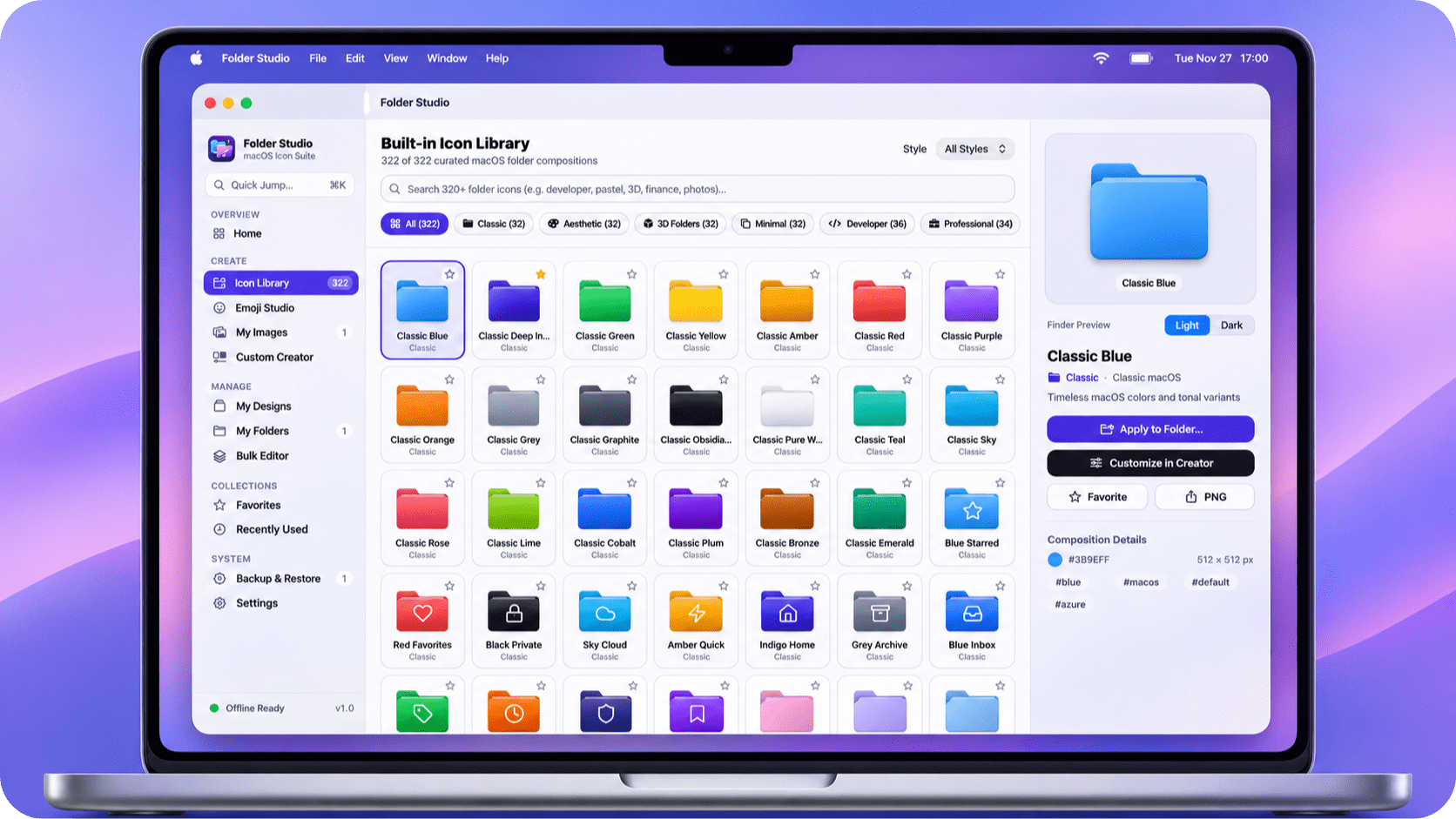
322 curated folder icons across Classic, Aesthetic, 3D, Minimal, Developer and Professional styles. Search, favourite, preview in light or dark Finder, and apply.
Emoji Studio
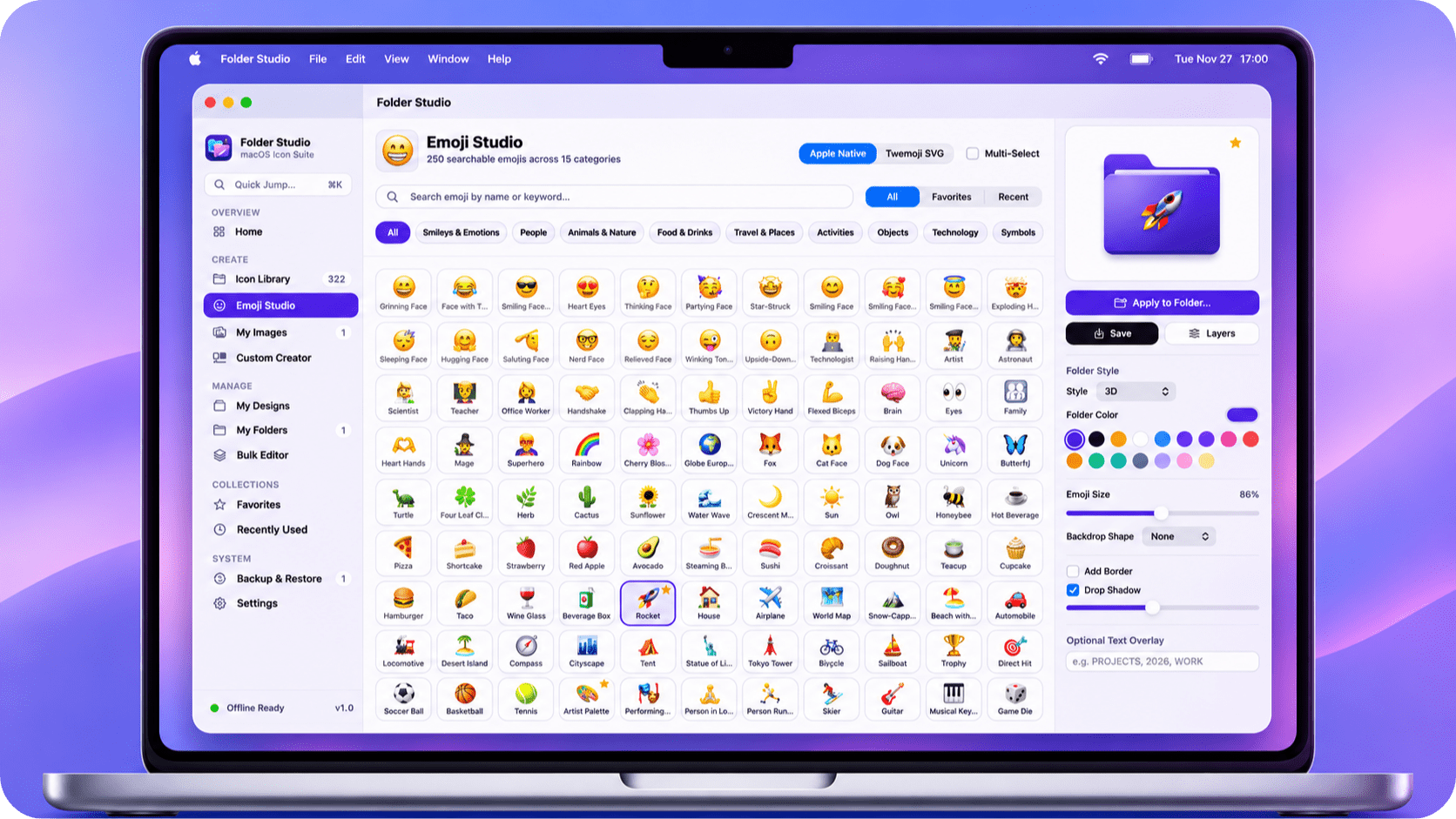
250 searchable emoji in 15 categories, Apple native or Twemoji. Pick the folder colour and style, emoji size, backdrop, border, shadow and an optional text label.
Custom Creator
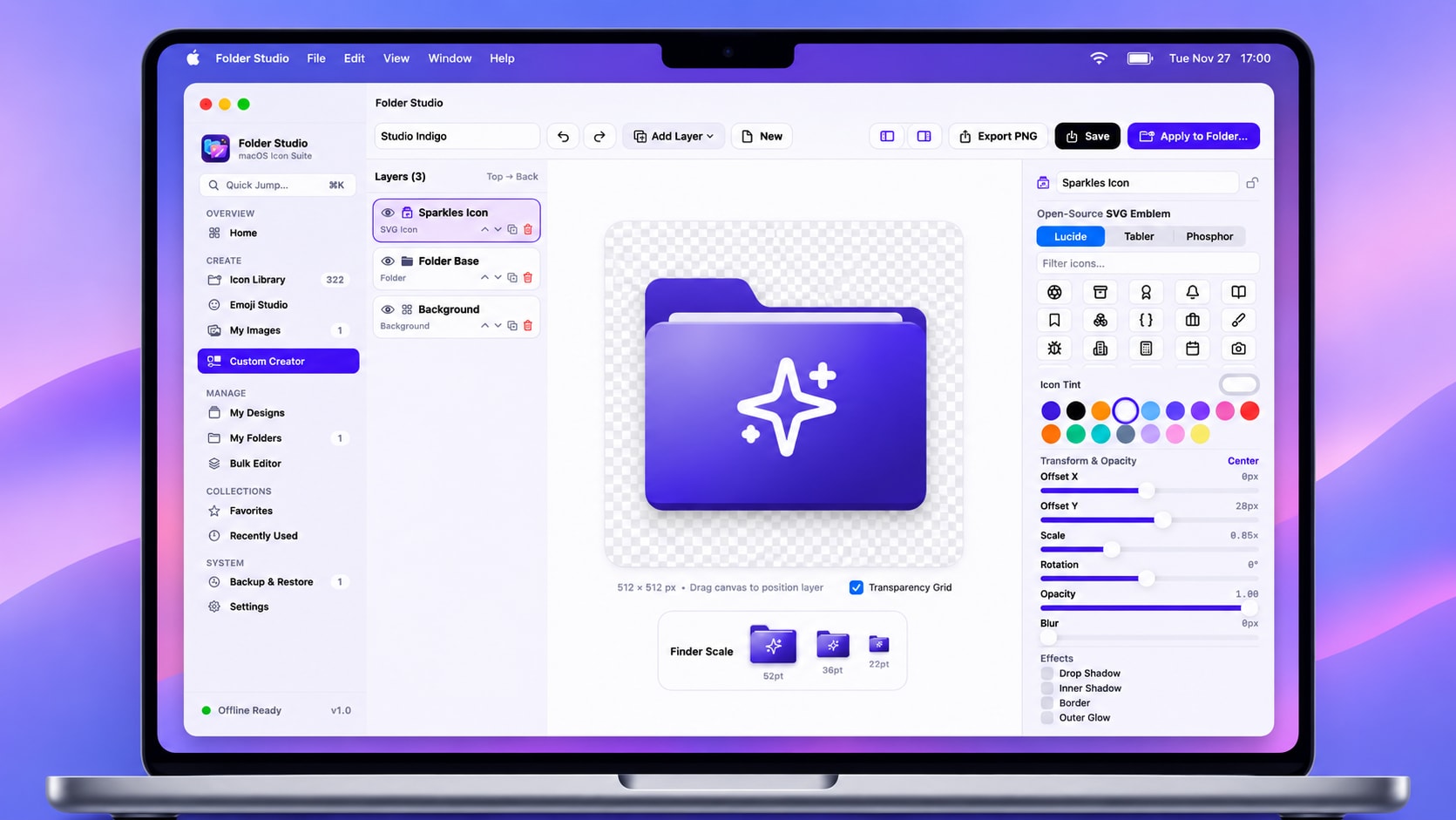
Build an icon from layers. Add SVG emblems from Lucide, Tabler or Phosphor, tint them, move, scale, rotate, and add shadows, borders or glow.
Your own images
Turn PNG, JPG, HEIC, WEBP, SVG or TIFF files into folder icons. Choose full-folder, front, rounded, circle or square coverage, crop, rotate and auto-remove backgrounds.
Bulk Editor
Style many folders at once instead of one by one, and keep every design in My Designs to reuse later.
Backup & Restore
Back up your designs and folder assignments, and restore them on the same Mac or a new one. Runs fully offline.
A folder icon app that makes Finder easier to scan
Every folder on a Mac looks the same blue. FolderStudio is a Mac folder icon app that gives each one a colour, an emoji, an emblem or a photo, so you find Projects, Clients or Photos at a glance instead of reading every name.
You pay once. There is no subscription and no account.
Folder icon maker for Mac: four ways to design an icon
- Icon Library: start from 322 ready-made icons in Classic, Aesthetic, 3D, Minimal, Developer and Professional styles. Preview in light or dark Finder before you apply.
- Emoji Studio: drop any of 250 emoji onto a folder in the colour and style you like, with an optional text label such as PROJECTS or 2026.
- Custom Creator: a layered folder icon editor. Stack layers, add open-source SVG emblems, and fine-tune position, scale, rotation and effects. Check how it looks at Finder sizes before you apply it.
- My Images: turn a photo into a folder icon, crop it, adjust brightness and contrast, and remove the background automatically.
Apply your design to any folder
- Pick or design an icon.
- Click Apply to Folder… and choose the folder.
- The new icon appears in Finder straight away.
Bulk folder icon changes, saved designs and backups
Most folder tools stop at one folder at a time. FolderStudio is built for whole project trees:
- Bulk Editor: style many folders at once instead of one by one.
- My Designs: keep every design and reuse it on new folders later.
- Backup & Restore: back up your designs and folder assignments, then restore them on the same Mac or a new one.
FolderStudio vs the built-in Finder option
On macOS Tahoe 26 or later, Finder's own Customize Folder menu already lets you pick a colour, symbol or emoji, and it is free. If that is all you need, use it. FolderStudio is for when you want more: a 322-icon library, layered designs with SVG emblems, your own photos, bulk editing, and backups.
New to customising folders? Our step-by-step guide to changing folder icons on a Mac covers the free methods first. Comparing apps? See the best Mac folder icon apps, including honest trade-offs.
Safe by design
- Only the icon changes. Files inside the folder are never touched.
- Non-destructive. Your original images are kept as they are.
- Private and offline. Everything happens on your Mac. Only licence activation goes online.
Works on your Mac
FolderStudio needs macOS 14 Sonoma or later and runs natively on Apple silicon and Intel Macs.
Guides and inspiration
- Colour-coding your folders? See how to change folder colour on Mac.
- Looking for ideas? Browse the 322 built-in Mac folder icons.
- Want your own picture on a folder? Learn how to use a photo as a folder icon.
Pricing
Pay once. Keep it.
No subscription. Every update is included.
$9.99
One-time payment
Everything included
- Unlimited folders, no limits
- Every future update included
- No account, no subscription
- 2-day refund
- Licence key by email
- Secure checkout
Documentation
Get the most from FolderStudio.
FAQ
FolderStudio questions, answered.
What is FolderStudio?
FolderStudio is a Mac folder icon app. It combines a library of 322 folder icons, an emoji tool, a layered icon creator and a photo tool, then applies the result to any folder in Finder.
Is FolderStudio a one-time purchase or a subscription?
It is a one-time payment. There is no subscription and no account, and every future update is included.
How is FolderStudio different from the built-in Customize Folder option in macOS?
Finder's built-in option on macOS Tahoe 26 covers colours, symbols and emoji. FolderStudio adds a 322-icon library, a layered Custom Creator with SVG emblems, your own photos as icons, a Bulk Editor, My Designs and Backup & Restore.
Does FolderStudio work on macOS Tahoe?
FolderStudio supports macOS 14 Sonoma or later, which includes macOS Tahoe 26, on Apple silicon and Intel.
Can I change many folders at once?
Yes. The Bulk Editor styles many folders in one go, and My Designs keeps every design so you can reuse it.
Does FolderStudio change or move my files?
No. It only changes the folder's icon. Everything inside the folder stays exactly where it is.
Which image formats can I use?
PNG, JPG, HEIC, WEBP, SVG and TIFF. Your originals are kept untouched in a non-destructive library.
Can I go back to the normal folder icon?
Yes. In Finder, select the folder, press Command-I, click the small icon at the top left and press Delete.
Does it need an internet connection?
No. FolderStudio works fully offline. Only licence activation goes online.
Can I move my designs to a new Mac?
Yes. Use Backup & Restore to save your designs and restore them on the new Mac.
From the blog
Reading about FolderStudio.
· Comparisons
Best Mac Folder Icon Apps in 2026 (Compared Honestly)
Compare the best apps to customize folder icons on Mac: FolderStudio, Color Folder, Folderizer, Folder Color and Image2icon. Prices, features and who each is best for.
Read article →· Guides
How to Change Folder Color on Mac (Built-In, Preview and App Methods)
Change the colour of a folder on your Mac with Finder's built-in colours, the Preview trick, or an app. Includes pink, green and colour-coding ideas.
Read article →· Guides
How to Change Folder Icons on Mac (4 Ways That Work in 2026)
Change a folder icon on your Mac with the built-in Customize Folder tool, Get Info, or an app. Step-by-step for macOS 14 to 26, plus how to restore the default.
Read article →· Icons
Mac Folder Icons: 322 Ready-Made Icons for Any Folder
Browse 322 Mac folder icons in six styles, or build your own with emoji and SVG emblems. Apply to any folder in Finder in one click. No icon-pack hunting.
Read article →· Guides
How to Use a Photo as a Folder Icon on Mac (PNG, JPG, HEIC, ICNS)
Turn any photo or PNG into a Mac folder icon. Step-by-step with Preview and Get Info, plus an easier way with FolderStudio, background removal and .icns tips.
Read article →More apps
More from Macnestt.

Try FolderStudio today.
The folder icon app for Mac. Design, apply and back up in seconds.